


Norwegian Cruise Line
4.82.09K Reviews
App Specs
- Version
- 1.42.0
- Updated On
- License
- Free
- Downloads
- 1,000,000+
- Developer
- Norwegian Cruise Line Holdings LTD
- Categories
- Travel & Local
- Platform
- Android
Screenshots
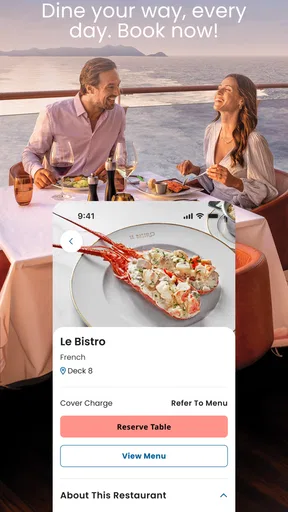
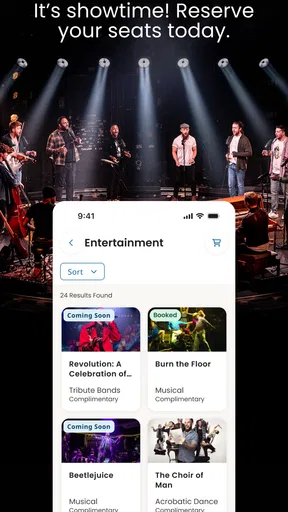
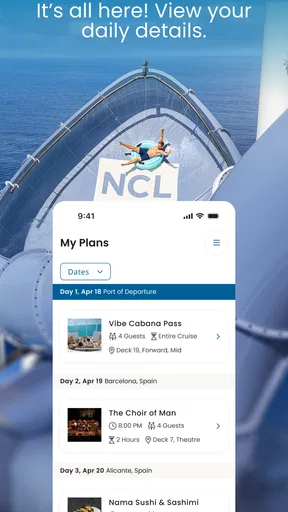
 Analysis by AppCompare
Before deciding whether to install Norwegian Cruise Line, I’d start with one practical question: are you already planning a Norwegian cruise, or are you looking for a general travel planner? This is a cruise-line companion from Norwegian Cruise Line Holdings LTD, not a broad tool for comparing flights, hotels, or trips across several providers. That distinction matters. Its value is tied to having a cruise reservation and wanting to keep the trip’s arrangements together.
I’d also think about how you prefer to organize a holiday. If you like checking plans on your phone rather than searching through emails and printed confirmations, a dedicated cruise app can reduce small bits of friction. If you prefer a paper itinerary, use a different cruise operator, or mainly need maps and general destination ideas, a regular travel app or your booking provider’s own tools may suit you better.
What makes it useful before you sail
The strongest reason to use this app is continuity: the same place can help you prepare for the sailing and refer back to plans while aboard. For a first-time cruiser, that can make an unfamiliar routine feel easier to manage. I’d use it to get a sense of the schedule, think through meals and activities, and avoid relying on memory when several plans compete for attention.
A small but useful habit is to review the itinerary when you have a quiet moment, then check it again before making another reservation. That gives you a chance to spot clashes between a planned activity and a meal rather than discovering the conflict at the last minute. The app is most helpful when treated as a planning aid, not as a reason to fill every hour.
Where the cruise-specific approach pays off
Unlike a general travel organizer, Norwegian Cruise Line’s app is focused on the ship experience: onboard dining, activities, trip arrangements, and keeping in touch with people in your party. That focus can be an advantage once you are preparing for or taking the cruise. Instead of sorting ship plans among unrelated travel tools, you have a single place designed around this particular holiday.
It also suits travelers who are comfortable handling routine arrangements on a phone. A couple can compare plans before choosing a dinner time; a family can use the itinerary as a shared reference when deciding what to do next; and someone traveling with friends can coordinate without repeatedly asking who has the latest schedule. Those are ordinary situations, but avoiding the back-and-forth can make a busy day feel calmer.
Where another option may be better
The app is not a substitute for a general-purpose trip planner if your holiday includes several operators, independent hotel stays, or lots of transport connections. In those cases, a calendar, notes app, or travel organizer that covers the whole journey may give you a more complete picture. I would keep the cruise app for ship-related arrangements and use a broader tool for anything that sits outside that experience.
Worth Reading Before You Choose

EA SPORTS FC Mobile 26 Is a Bigger Football Game, but It Takes Time

Flipboard Shows What News Apps Must Do Beyond the Feed

Switching to Android Auto Means Rethinking Your Driving Routine

Google Calendar Makes a Crowded Week Easier to Manage

Ludo King Makes the Most of the Minutes Between Plans

Baby Panda World Brings Quick Play to Modern Phones, but Its Game Library Feels Busy
It is also a less natural fit for someone who does not want to depend on a phone while traveling. A printed copy of essential plans can be a sensible backup, especially if you prefer to look over a whole day at once. Using the app does not mean you must abandon paper; the best setup is the one that lets you find important information comfortably when you need it.
Practical trade-offs before installing
The app is free and rated for Everyone, so there is no purchase decision to make before trying it. Norwegian Cruise Line has a 4.7 average from around 27,000 ratings, and it has been installed over 500,000 times. Those figures suggest that many travelers find it worthwhile, though ratings cannot tell you whether its cruise-focused approach matches your own habits.
For a realistic example, imagine arriving at the ship with a dinner reservation and an activity in mind, while another person in your group wants to meet later. I’d check the itinerary, agree on a meeting point, and leave some unscheduled time rather than building a rigid plan around every listing. The app can help everyone refer to the same arrangements, but the group still needs to make decisions and communicate clearly.
One trade-off with any dedicated travel app is that it adds another account and another place to check. I would install it before departure, sign in with the reservation details, and make sure I can reach the relevant plans while I have a reliable connection. I would also keep key confirmations somewhere familiar, rather than assuming one app should be the only record of the trip.
Version 1.38.0 requires Android 7.0 or later. If your phone is older, check compatibility before you build your trip routine around the app. It is a modest detail, but it is better to discover a device limitation at home than while preparing to leave.
Have you ever dreamed of sailing across the oceans with all the luxuries and conveniences right at your fingertips? Well, guess what? The Norwegian Cruise Line app is here to make those dreams come true. I’ve taken it for a spin, and let me just say, it’s like having a personal cruise assistant in your pocket.
Getting Started with Ease
First things first, downloading the Norwegian Cruise Line app was a breeze. Available for both Android and iOS, you can find it easily on your respective app store. Once downloaded, setting up is straightforward. You just need to log in with your cruise reservation details, and you’re good to go. If you’re like me and slightly skeptical about giving apps your info, rest assured, the process is secure and quick.
Your Cruise Companion
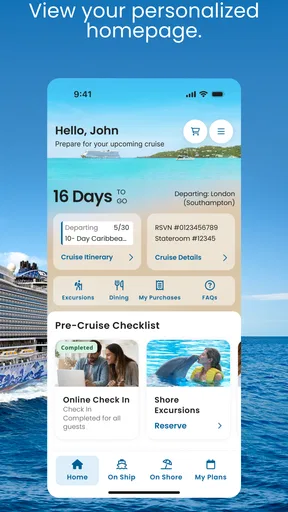
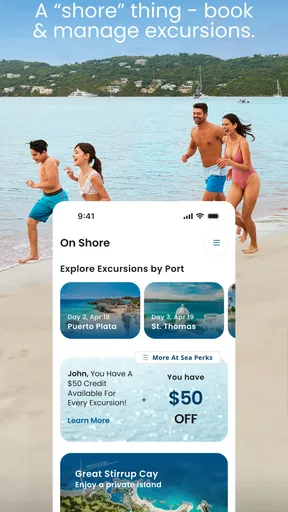
The app immediately impressed me with its sleek design and intuitive interface. It’s like having a digital concierge ready to cater to your every need. From booking excursions to reserving dinner tables, the app handles it all. I found the detailed itinerary feature particularly useful. It keeps all your plans in one place, so you’re always in the know about what’s happening next.
And let’s not forget about the onboard activities. The app provides a comprehensive list of all the fun things to do on the ship. Whether you’re into live shows, spa sessions, or poolside lounging, you can plan your day effortlessly. Plus, with the ship map, you'll never get lost on those massive decks!
Dining and Dining
Foodies, rejoice! The app lets you explore all the dining options available onboard. You can make reservations, browse menus, and even check out dress codes—because nobody wants to turn up to a formal dinner in shorts, right? I loved how easy it was to secure a table at specialty restaurants. With just a few taps, my culinary adventures were set.
Stay Connected
Being away at sea doesn’t mean you have to disconnect. The app offers messaging features to keep in touch with fellow travelers or family members. This came in handy for coordinating meet-ups without racking up roaming charges.
Plus, the app keeps you updated with any important announcements or changes in schedule. It’s like having a crew member whispering updates directly to your phone.
Effortless Check-In and Check-Out
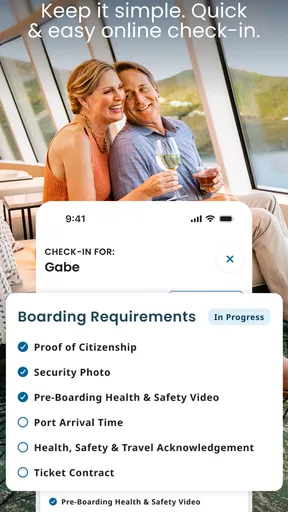
The check-in process is where the app truly shines. You can complete it before you even set foot on the ship, saving you time and hassle. I loved not having to deal with paperwork at the terminal. And when it’s sadly time to say goodbye, the check-out is equally seamless, helping you avoid those long lines.
Final Thoughts
All in all, the Norwegian Cruise Line app elevates your cruising experience by making everything accessible and efficient. It’s designed to enhance your trip, allowing you to focus on what matters most: enjoying your vacation. Whether you’re a seasoned cruiser or a newbie, this app is a must-have. Trust me, once you use it, you’ll wonder how you ever cruised without it.
So, next time you’re setting sail with Norwegian, don’t forget to download the app. It’s your ultimate travel buddy on the high seas!
Pros
- User-friendly interface for seamless navigation.
- Real-time updates on cruise activities and events.
- Easy booking and reservation management.
- Access to detailed cruise itineraries and maps.
- Personalized recommendations based on preferences.
Cons
- Limited offline functionality for remote areas.
- Occasional glitches with the notification system.
- Requires frequent updates for optimal performance.
- Limited customization options for user profiles.
- Some features inaccessible without internet.
FAQs for Norwegian Cruise Line
What features does the Norwegian Cruise Line app offer?
The Norwegian Cruise Line app offers a range of features designed to enhance your cruising experience. Users can explore daily activities, view ship maps, make dining and excursion reservations, and even check their onboard account balances. The app also allows for seamless communication with fellow travelers, making it an essential tool for navigating your cruise.
Is the Norwegian Cruise Line app available for both Android and iOS?
Yes, the Norwegian Cruise Line app is available for both Android and iOS devices. You can download it from the Google Play Store for Android devices or the Apple App Store for iOS devices. Ensure your device meets the necessary operating system requirements for optimal performance.
Do I need an internet connection to use the Norwegian Cruise Line app onboard?
While some features of the Norwegian Cruise Line app require an internet connection, many essential functions can be accessed offline. However, to get the most out of the app, such as messaging and booking services, purchasing an onboard Wi-Fi package is recommended for full connectivity throughout your cruise.
Can I check in for my cruise through the Norwegian Cruise Line app?
Yes, the app provides a convenient mobile check-in feature. Before your cruise, you can complete the check-in process directly through the app, saving time at the port. Ensure all required personal information and documents are uploaded to streamline your boarding experience.
Is the Norwegian Cruise Line app user-friendly for first-time cruisers?
Absolutely, the app is designed with user-friendliness in mind, catering to both seasoned cruisers and first-timers. The intuitive interface and helpful tutorials guide users through all features, from booking reservations to exploring ship amenities, ensuring everyone can navigate their cruise with ease.


